20 Nov 2026 · by Md. Shakil Ahmed
DevSecOps for Developers: Six Security Gates for Your Pipeline
For years, security was something that happened once, just before a release. A reviewer found a problem, the team was already late, and the fix meant redoing work that was supposedly finished.
DevSecOps turns that around. Instead of one big review at the end, you put small, automatic checks at every stage of the pipeline, so problems are found when they are cheapest to fix: the moment they are committed. This idea is called shift left, because you move security towards the left of the timeline, closer to the code.
Here are the six gates I recommend, in the order a change passes through them.
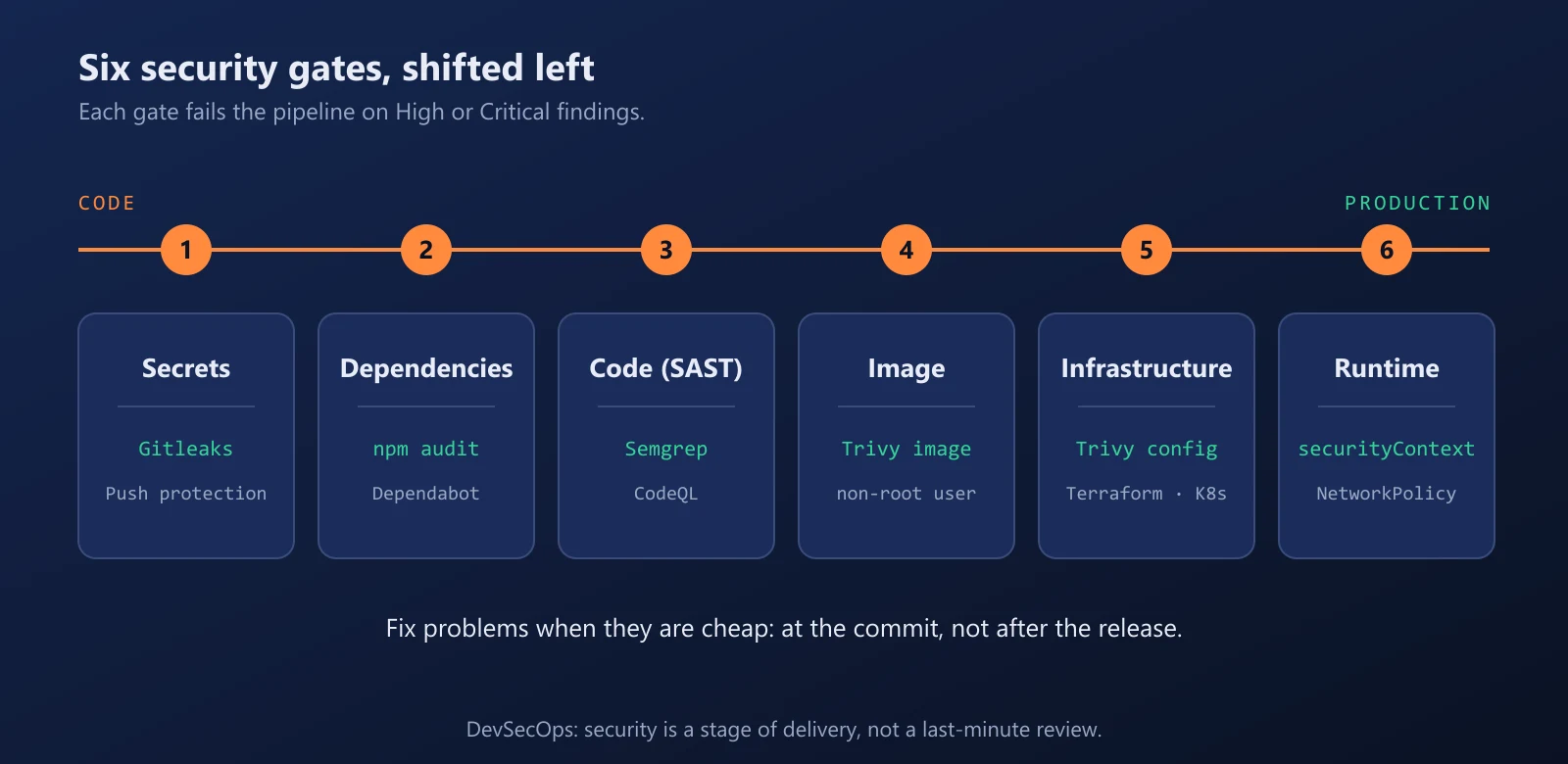
Gate 1: Secrets (Gitleaks and push protection)
A password or API key committed by mistake is the most expensive kind of bug. Bots scan public repositories continuously, and a leaked cloud key can be abused within minutes.
Scan your history locally with Gitleaks:
docker run --rm -v "$(pwd):/repo" ghcr.io/gitleaks/gitleaks:latest git -v /repo
Also switch on secret scanning and push protection in your GitHub repository settings, which blocks the push before the secret ever lands.
If a secret does leak, rotate it first. Deleting it in a new commit is not enough, because it stays in Git history. Revoke the key, create a new one, then clean up.
Gate 2: Dependencies (npm audit and Dependabot)
Most of your application is code written by other people. A known vulnerability in a package is a vulnerability in your product.
npm audit --audit-level=high
That command fails only for High and Critical problems, which keeps the signal useful. Then let Dependabot keep things fresh by adding .github/dependabot.yml:
version: 2
updates:
  - package-ecosystem: "npm"
    directory: "/"
    schedule:
      interval: "weekly"
  - package-ecosystem: "docker"
    directory: "/"
    schedule:
      interval: "weekly"
  - package-ecosystem: "github-actions"
    directory: "/"
    schedule:
      interval: "weekly"
It opens pull requests for outdated npm packages, base images and GitHub Actions, so updates arrive in small, reviewable pieces instead of one scary upgrade.
Gate 3: Your own code (SAST with Semgrep or CodeQL)
Static analysis reads the source without running it and looks for risky patterns, such as user input reaching a database query or the page without validation (SQL injection, XSS).
docker run --rm -v "$(pwd):/src" semgrep/semgrep semgrep scan --config auto
On public repositories, GitHub's CodeQL is free: enable Code scanning in the security settings and it analyses every push.
Gate 4: The container image (Trivy)
Your Docker image contains an operating system and libraries, and those have vulnerabilities too.
docker run --rm -v /var/run/docker.sock:/var/run/docker.sock \
  aquasec/trivy:latest image --severity HIGH,CRITICAL my-app:latest
The report lists each CVE, the affected package and the version that fixes it. Often the fix is just a newer base image. Then make the image itself safer by not running as root:
FROM node:22-alpine
WORKDIR /app
COPY package*.json ./
RUN npm ci --omit=dev
COPY --chown=node:node . .
USER node
EXPOSE 3000
CMD ["node", "index.js"]
The official Node image already contains a non-root node user, so USER node is all it takes. Add a .dockerignore with node_modules, .git, .env and *.log, so secrets and junk never enter the image.
Gate 5: Infrastructure as code (Trivy config)
Misconfigurations in Terraform, Kubernetes YAML and Dockerfiles are security bugs too: a public S3 bucket, an unencrypted disk, a container running as root, a pod with no resource limits. The same tool can check them:
docker run --rm -v "$(pwd):/project" aquasec/trivy:latest config /project
Gate 6: Runtime (Kubernetes hardening)
Passing the pipeline is not the end. In the cluster, give every container the minimum it needs:
securityContext:
  runAsNonRoot: true
  allowPrivilegeEscalation: false
  readOnlyRootFilesystem: true
  capabilities:
    drop: ["ALL"]
Enforce the rules for a whole namespace with Pod Security:
kubectl label namespace production pod-security.kubernetes.io/enforce=restricted
Then remember three more habits: Kubernetes Secrets are only base64-encoded, not encrypted, so use a proper secrets manager; add a NetworkPolicy so pods can only talk to what they must; and never hand out cluster-admin where a narrow RBAC role will do. Give every container CPU and memory limits too.
Putting it all in one workflow
Here is a compact security.yml that runs the first gates on every push and pull request. Each scanner fails the job on High or Critical findings:
name: Security Checks
on:
  push:
    branches: ["main"]
  pull_request:

jobs:
  security:
    runs-on: ubuntu-latest
    steps:
      - uses: actions/checkout@v4
        with:
          fetch-depth: 0            # full history so Gitleaks can see old commits

      - name: Secret scan (Gitleaks)
        uses: gitleaks/gitleaks-action@v2
        env:
          GITHUB_TOKEN: ${{ secrets.GITHUB_TOKEN }}

      - uses: actions/setup-node@v4
        with:
          node-version: 22

      - name: Dependency audit
        run: |
          npm ci
          npm audit --audit-level=high

      - name: Build image
        run: docker build -t app:${{ github.sha }} .

      - name: Image scan (Trivy)
        uses: aquasecurity/trivy-action@0.28.0
        with:
          image-ref: app:${{ github.sha }}
          severity: HIGH,CRITICAL
          ignore-unfixed: true
          exit-code: "1"

      - name: IaC scan (Trivy config)
        uses: aquasecurity/trivy-action@0.28.0
        with:
          scan-type: config
          scan-ref: .
          severity: HIGH,CRITICAL
          exit-code: "1"
exit-code: "1" is what makes a gate a gate: High or Critical findings stop the pipeline instead of just printing a warning nobody reads.
Two supply-chain habits worth adopting
- Pin third-party actions to a commit SHA. Version tags can be moved to point at different code. A full SHA cannot, so a compromised action cannot silently change under you. (Keep tags in tutorials for readability, and pin in production.)
- Generate an SBOM and sign your images. An SBOM (software bill of materials) lists every package in an image, so when a new vulnerability is announced you can answer "are we affected?" in seconds. Trivy can produce one in CycloneDX format, and a tool like Cosign can sign the image so you can prove it came from your pipeline.
A checklist to copy
- Secret scanning and push protection are on
- Dependabot opens weekly updates
- The pipeline runs SAST, dependency, image and IaC scans, and fails on High/Critical
- Containers run as a non-root user, and
.dockerignoreexcludes.env - Kubernetes has securityContext, Pod Security, NetworkPolicy and resource limits
- Secrets live in a secrets manager or GitHub Secrets, never in Git
Start with one gate this week, probably secrets, and add the rest one at a time. A pipeline that nobody trusts gets ignored, so keep the noise low and the rules strict.
This is chapter 11 of DevOps for Developers (Bengali Edition), with exercises and a hands-on challenge that adds this pipeline to a real e-commerce project. Read about the book, or contact me if you want a DevSecOps review of your pipeline.
Need help with a project like this?
Get in touch